🤖 👨💻 Agent Codemode
Generate programmatic tools from MCP Servers and Skills.
What is Agent Codemode?
Agent Codemode generates programmatic tools from two sources:
- MCP Servers - Connect to any MCP server and generate typed Python bindings for its tools
- Skills - Reusable code patterns that compose multiple tools into higher-level operations
These programmatic tools can be:
- Used directly by an agent - Import generated bindings and call tools from your agent's code
- Exposed as an MCP Server - Serve the generated tools via MCP protocol for any MCP-compatible client
Agent Codemode uses Code Sandboxes for safe, isolated code execution.
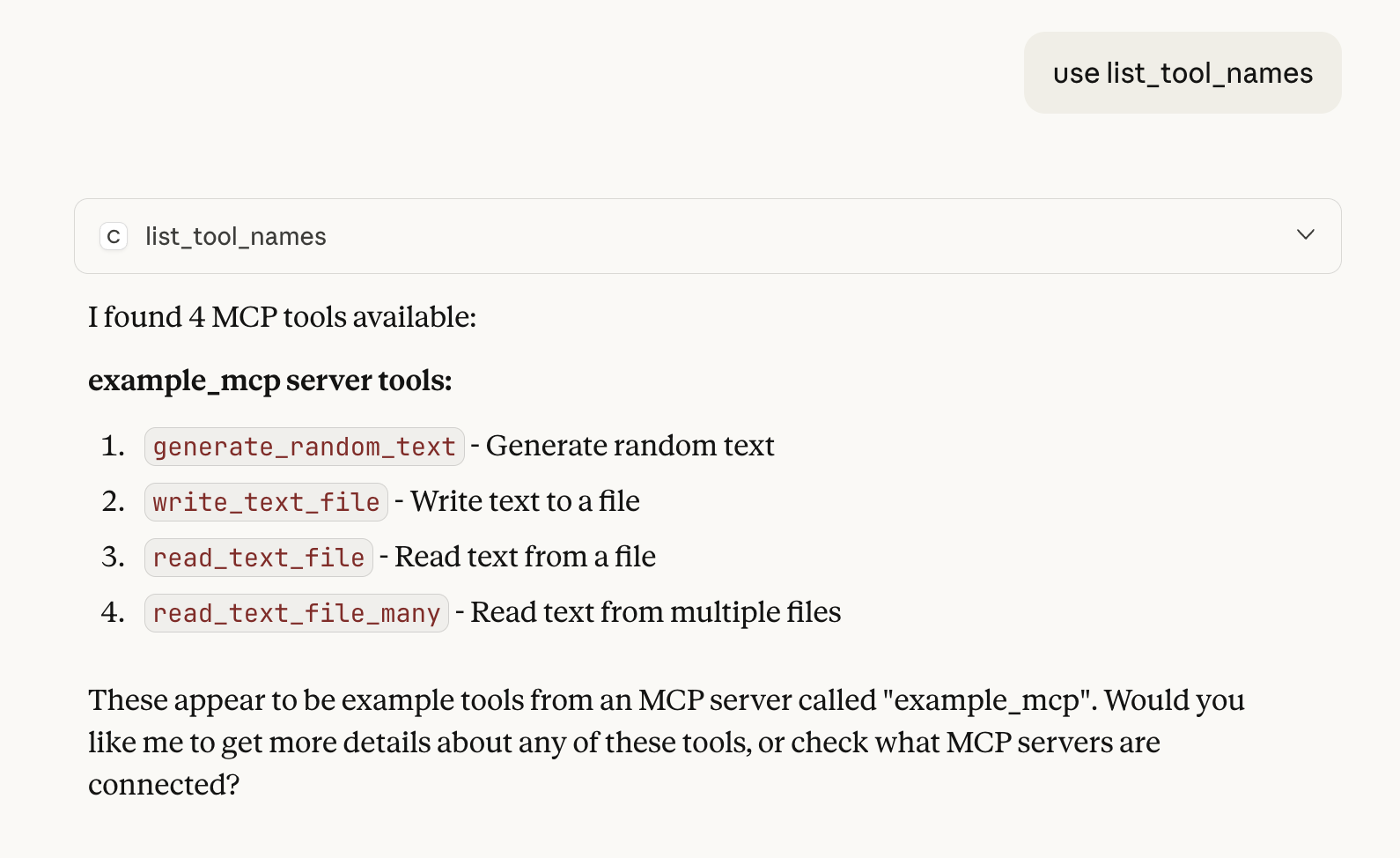
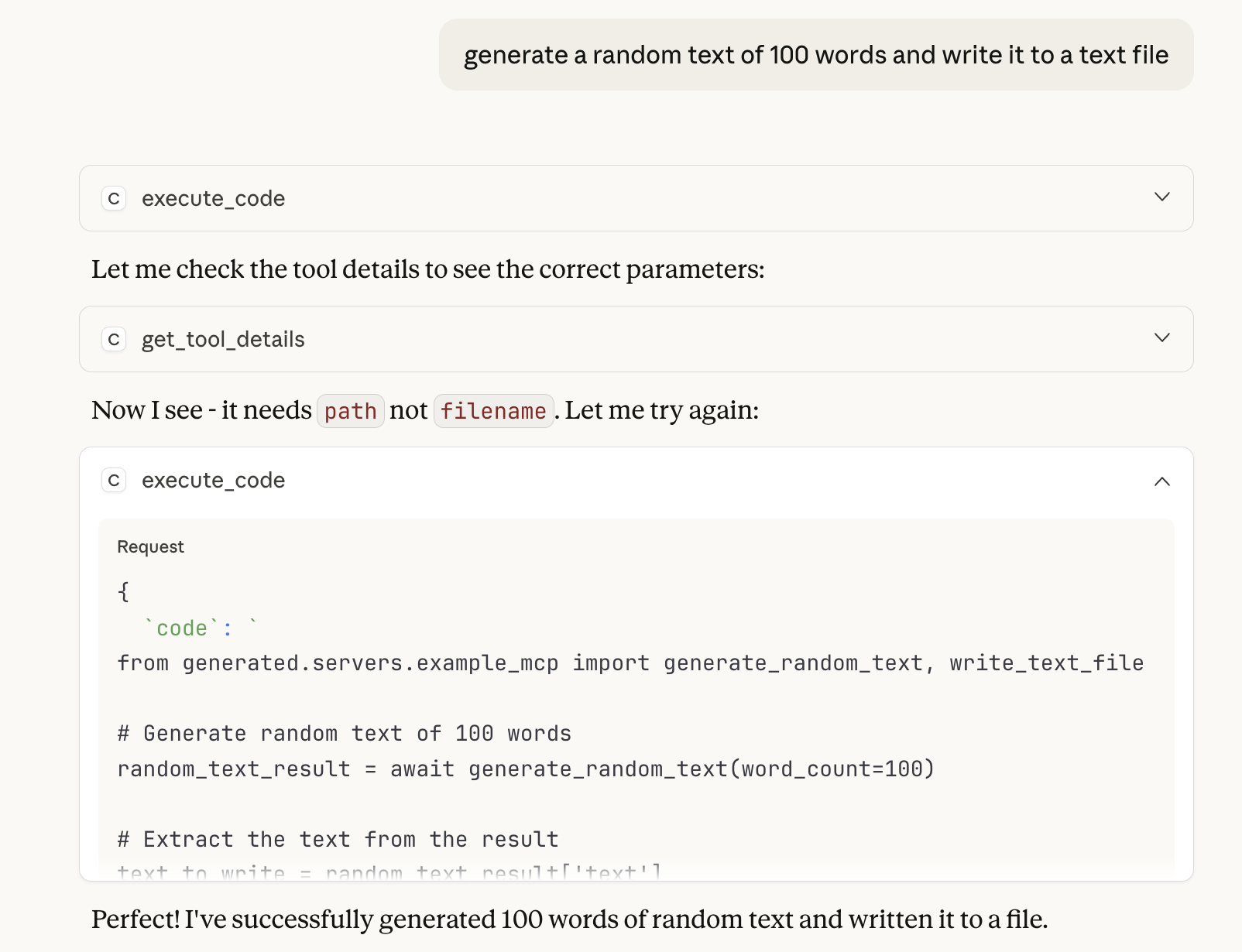
Package Scope
Agent Codemode is the tool generation layer in the Datalayer AI stack:
┌─────────────────────────────────────────────────────────────┐
│                     agent-runtimes                          │
│            (Agent hosting, protocols, UI)                   │
├──────────────────────────┬──────────────────────────────────┤
│      agent-skills        │         agent-codemode           │  ◀── You are here
│  (skills management)     │  (tool generation from MCP/Skills)│
├──────────────────────────┴──────────────────────────────────┤
│                    code-sandboxes                           │
│          (Safe code execution environment)                  │
└─────────────────────────────────────────────────────────────┘
What Agent Codemode Does:
- ✅ Generate programmatic tools from MCP Servers (typed Python bindings)
- ✅ Generate programmatic tools from Skills (reusable compositions)
- ✅ Provide progressive tool discovery (search_tools, get_tool_details)
- ✅ Execute Python code that composes tools (CodeModeExecutor)
- ✅ Expose generated tools directly to agents or via MCP Server
Not Responsible For:
- ❌ Raw code execution isolation (→ code-sandboxes)
- ❌ Skill lifecycle management (→ agent-skills)
- ❌ Agent protocols or UI components (→ agent-runtimes)
Why Code Mode?
Traditional AI agents call tools one at a time, with each call requiring an LLM inference round-trip. This approach has limitations:
- Inefficient: Multiple LLM calls for multi-step operations
- Error-prone: No robust error handling between tool calls
- Limited: Cannot leverage programming constructs like loops or conditionals
- Not reusable: Patterns must be rediscovered each time
Agent Codemode solves these by letting agents write code that composes tools:
# Instead of many individual tool calls...
# The agent writes code that orchestrates tools programmatically

from generated.servers.filesystem import read_file, write_file
import asyncio

# Read multiple files in parallel
files = ["config.json", "data.csv", "readme.md"]
contents = await asyncio.gather(*[
    read_file({"path": f"/data/{f}"}) for f in files
])

# Process with try/except for robustness
for i, content in enumerate(contents):
    try:
        processed = content.upper()
        await write_file({"path": f"/output/{files[i]}", "content": processed})
    except Exception as e:
        print(f"Failed to process {files[i]}: {e}")
Same task, same MCP server — Code Mode uses significantly fewer tokens by composing tools in code instead of multiple LLM round-trips.
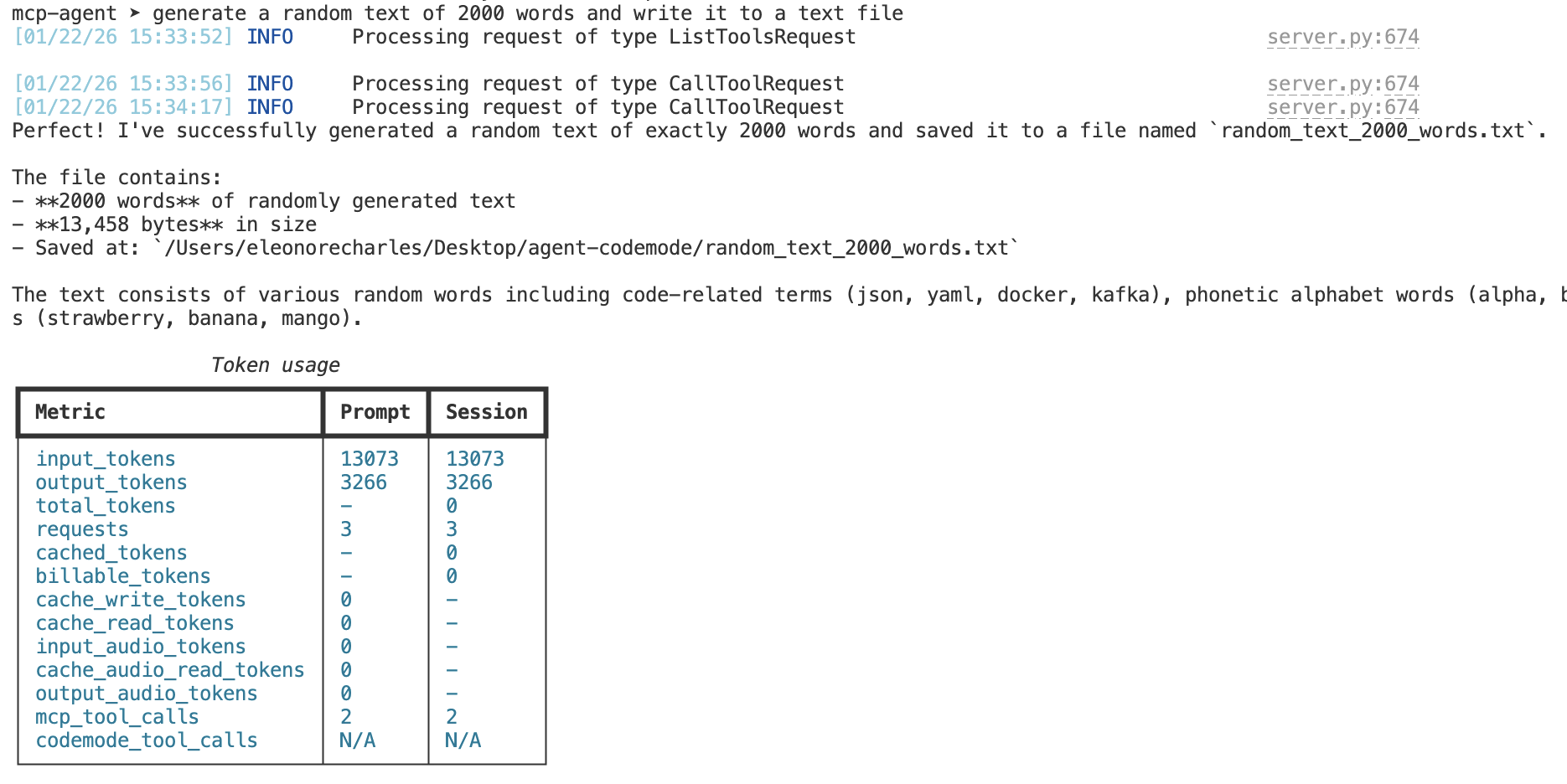
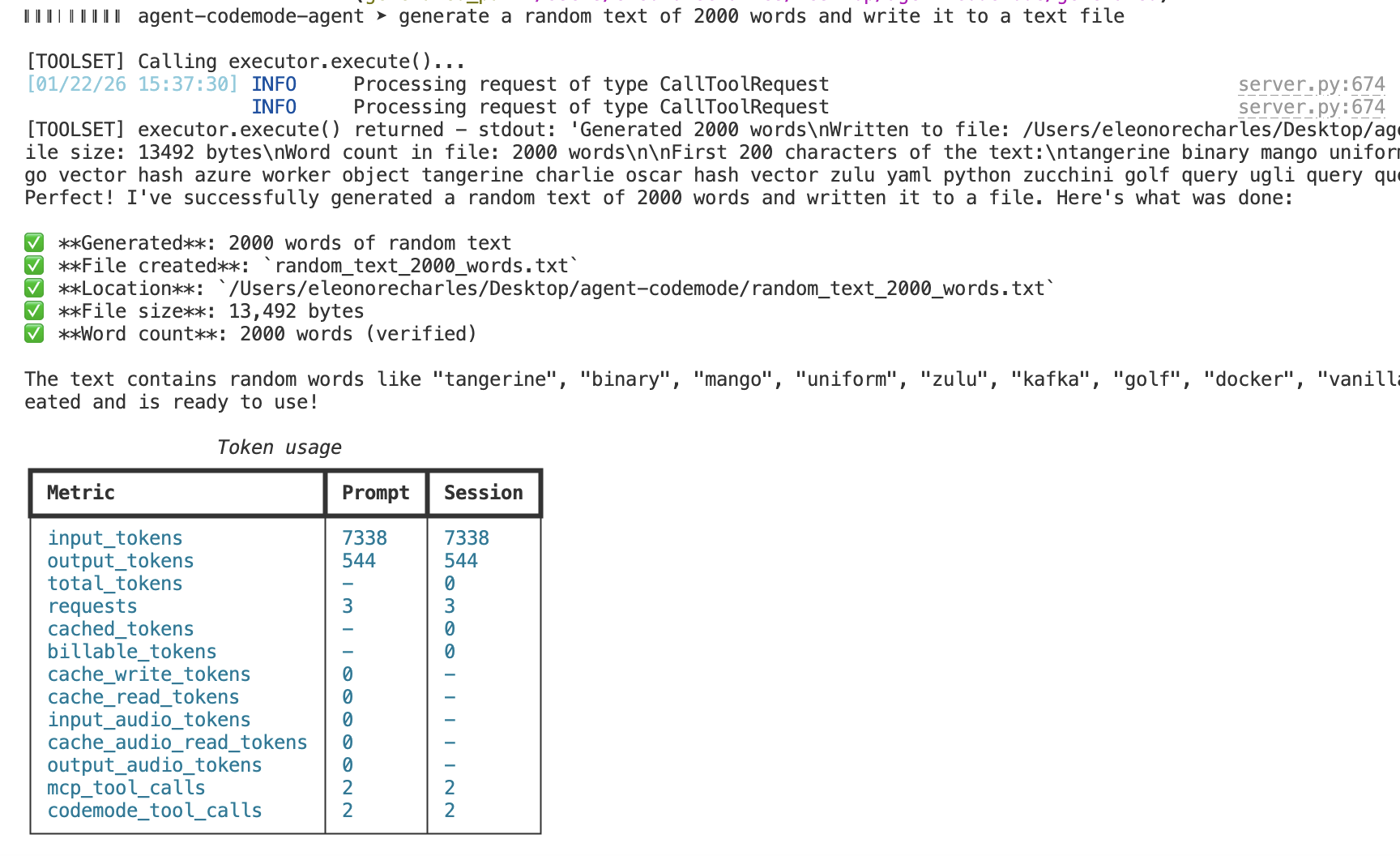
Prompt: "Generate 2000 words of random text and write to a file"
Before vs After (Codemode pattern)
Codemode follows the same “wrap tools, then let the model write code” pattern popularized by Cloudflare’s Code Mode. The flow looks like this:
Before (traditional tool calls): the model calls each tool directly.
After (Codemode): you give the model meta-tools that let it discover tools and execute Python code that composes them.
Example (Agent Codemode, Python):
from agent_codemode import ToolRegistry, CodeModeExecutor, MCPServerConfig

# Configure the registry with MCP servers
registry = ToolRegistry()
registry.add_server(MCPServerConfig(
    name="filesystem",
    transport="stdio",
    command="npx",
    args=["-y", "@anthropic/mcp-server-filesystem", "/tmp"],
))
await registry.discover_all()

# Execute code that composes tools
executor = CodeModeExecutor(registry)
await executor.setup()

result = await executor.execute("""
    from generated.servers.filesystem import read_file, write_file
    content = await read_file({"path": "/tmp/input.txt"})
    await write_file({"path": "/tmp/output.txt", "content": content.upper()})
""")
In Agent Codemode, the same idea is exposed as meta-tools (list_tool_names, search_tools, execute_code, etc.). When Codemode is enabled in agent-runtimes, selected MCP servers are converted into Codemode tool bindings instead of being exposed directly as individual tools.
Key Features
🔌 Generate from MCP Servers
Connect to any MCP server and generate typed Python bindings:
from agent_codemode import ToolRegistry, MCPServerConfig

registry = ToolRegistry()
registry.add_server(MCPServerConfig(
    name="filesystem",
    transport="stdio",
    command="npx",
    args=["-y", "@anthropic/mcp-server-filesystem", "/workspace"]
))
await registry.discover_all()

# Now use the generated bindings
from generated.servers.filesystem import read_file, write_file
content = await read_file({"path": "/workspace/data.txt"})
See MCP Tools for complete documentation.
🎯 Generate from Skills
Use reusable code patterns that compose multiple tools:
# skills/batch_process.py
async def batch_process(input_dir: str, output_dir: str) -> dict:
    from generated.servers.filesystem import list_directory, read_file, write_file

    entries = await list_directory({"path": input_dir})
    for entry in entries["entries"]:
        content = await read_file({"path": f"{input_dir}/{entry}"})
        await write_file({"path": f"{output_dir}/{entry}", "content": content.upper()})
    return {"processed": len(entries["entries"])}

# Use the skill
from skills.batch_process import batch_process
result = await batch_process("/data/input", "/data/output")
See Skills for complete documentation.
🔍 Progressive Tool Discovery
Large tool catalogs (100+ tools) are overwhelming for LLMs. The Tool Search Tool enables progressive discovery:
# Find relevant tools without loading all definitions
result = await search_tools("file operations", limit=10)
for tool in result["tools"]:
    print(f"{tool['name']}: {tool['description']}")
See Tool Discovery for complete documentation.
🔌 Use Directly or Expose as MCP Server
The generated programmatic tools can be:
Used directly by an agent:
from pydantic_ai import Agent
from agent_codemode import CodemodeToolset

agent = Agent(
    "anthropic:claude-sonnet-4-20250514",
    toolsets=[CodemodeToolset(registry)]
)
result = await agent.run("Process all files in /data")
See Integrations for complete documentation.
Exposed as an MCP Server:
from agent_codemode import codemode_server, configure_server

# Configure with your registry
configure_server(config=config, registry=registry)
codemode_server.run()
Or run directly:
python -m agent_codemode.server --workspace /workspace
See MCP Server for complete documentation.
Quick Start
pip install agent-codemode
from agent_codemode import ToolRegistry, CodeModeExecutor, MCPServerConfig

# Set up registry with MCP servers
registry = ToolRegistry()
registry.add_server(MCPServerConfig(
    name="filesystem",
    transport="stdio",
    command="npx",
    args=["-y", "@anthropic/mcp-server-filesystem", "/tmp"]
))
await registry.discover_all()

# Execute code that composes tools
executor = CodeModeExecutor(registry)
await executor.setup()

result = await executor.execute("""
    from generated.servers.filesystem import read_file, write_file

    content = await read_file({"path": "/tmp/input.txt"})
    await write_file({"path": "/tmp/output.txt", "content": content.upper()})
""")
Documentation
📄️ Agent Codemode
Generate programmatic tools from MCP Servers and Skills.
📄️ Concepts
This page explains the core concepts behind Agent Codemode and why it's a powerful paradigm for AI agents.
📄️ Getting Started
This guide will help you get Agent Codemode up and running quickly.
📄️ MCP Tools
MCP Servers are one of the two sources Agent Codemode uses to generate programmatic tools (the other being Skills).
📄️ Skills
Skills are one of the two sources Agent Codemode uses to generate programmatic tools (the other being MCP Tools).
📄️ Programmatic Tools
After generating programmatic tools from MCP Servers and Skills, you can execute them using the CodeModeExecutor.
📄️ Tool Discovery
Agent Codemode provides progressive tool discovery to efficiently find relevant tools from the programmatic tools generated from MCP Servers and Skills.
📄️ Integrations
The programmatic tools generated by Agent Codemode (from MCP Servers and Skills) can be used in two ways:
📄️ MCP Server
The programmatic tools generated by Agent Codemode (from MCP Servers and Skills) can be exposed as an MCP Server for any MCP-compatible client.
📄️ Examples
Run the examples from the examples folders.
Inspiration
Agent Codemode is inspired by:
- Cloudflare Code Mode - The better way to use MCP
- Cloudflare's open-source Code Mode agent
- Anthropic Code execution with MCP - Building more efficient agents
- Anthropic Introducing advanced tool use - Claude Developer Platform